Full Length Practice Test 10
Read the instructions and syllabus carefully before you begin.
Test Details
Duration: 180 mins
Questions: 120
Total Marks: 200
-
-
- The Questions Palette displayed on the right side of the screen will show the status of each question using one of the following symbols:
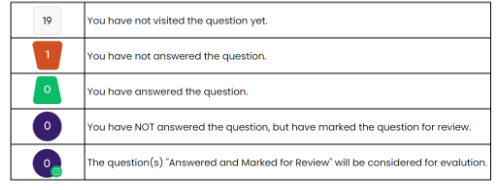
- You can click on the ">" arrow which appears to the left of the question palette to collapse the question palette thereby maximizing the question window. To view the question palette again, you can click on "<" which appears on the right side of the question window.
- You can click on the "View Instructions" button on the top right corner of your screen to check the instructions during the exam for the entire question paper.
Navigating to a Question:
- To answer a question, do the following:
- Click on the question number in the Question Palette at the right of your screen to go to that numbered question directly. Note that using this option does NOT save your answer to the current question.
- Click on Save & Next to save your answer for the current question and then go to the next question.
- Click on Mark for Review & Next to save your answer for the current question, mark it for review, and then go to the next question.
Answering a Question:
- Procedure for answering a multiple choice type question:
- To select your answer, click on the button of one of the options.
- To deselect your chosen answer, click on the button of the chosen option again or click on the Clear button.
- To change your chosen answer, click on the button of another option
- To save your answer, you MUST click on the Save & Next button.
- To mark the question for review, click on the Mark for Review & Next button.
- To change your answer to a question that has already been answered, first select that question for answering and then follow the procedure for answering that type of question.
Navigating through sections:
- Sections in this question paper are displayed on the top bar of the screen. Questions in a section can be viewed by clicking on the section name. The section you are currently viewing is highlighted.
- After clicking the Save & Next button on the last question for a section, you will automatically be taken to the first question of the next section.
- You can shuffle between questions during the examination as per your convenience only during the time stipulated.
- Candidates can view the corresponding section summary as part of the legend that appears in every section above the question palette.
- I have read and understood the instructions. All computer hardware allotted to me is in proper working condition. I declare that I am not in possession of / not wearing / not carrying any prohibited gadget like mobile phone, Bluetooth devices, etc. /any prohibited material with me into the Examination Hall. I agree that in case of not adhere to the instructions, I shall be liable to be debarred from this Test and/or to disciplinary action, which may include a ban from future Tests / Examinations.
-
Ready to Begin?
Once you start, the timer will begin and cannot be paused.