AITS:2
Read the instructions and syllabus carefully before you begin.
Instructions:
1. The clock will be set at the server. The countdown timer in the top left corner of the screen will display the remaining time available for you to complete the examination. When the timer reaches zero, the examination will end by itself. You will not be required to end or submit your examination.
2. The Questions Palette displayed on the right side of screen will show the status of each question using one of the following symbols:
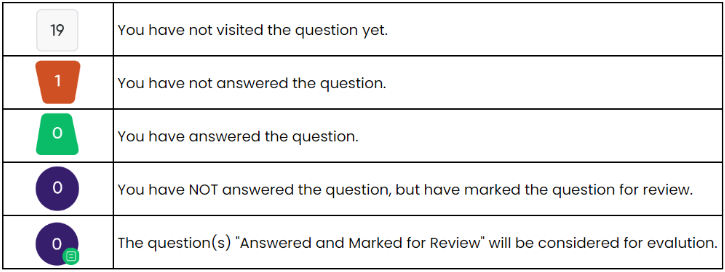
3. You can click on the language dropdown on the top right corner of the question box to change the language during the exam for the entire question paper. On clicking on the button you will get a drop-down to change the question content to the desired language.
Navigating to a Question:
4. To answer a question, do the following:
(a) Click on the question number in the Question Palette at the right of your screen to go to that numbered question directly. Note that using this option does NOT save your answer to the current question.
(b) Click on Save & Next to save your answer for the current question and then go to the next question.
(c) Click on Mark for Review & Next to save your answer for the current question, mark it for review, and then go to the next question.
Answering a Question:
5. Procedure for answering a multiple choice type question:
(a) To select your answer, click on the button of one of the options.
(b) To deselect your chosen answer, click on the button of the chosen option again or click on the Clear response button
(c) To change your chosen answer, click on the button of another option
(d) To save your answer, you MUST click on the Save & Next button.
(e) To mark the question for review, click on the Mark for Review & Next button.
6. To change your answer to a question that has already been answered, first select that question for answering and then follow the procedure for answering that type of question.
Navigating through sections:
7. Sections in this question paper are displayed on the top bar of the screen. Questions in a section can be viewed by click on the section name. The section you are currently viewing is highlighted.
8. After clicking the Save & Next button on the last question for a section, you will automatically be taken to the first question of the next section.
9. You can shuffle between sections and question anything during the examination as per your convenience only during the time stipulated.
10. Candidates can view the corresponding section summary as part of the legend that appears in every section above the question palette.