Quick Revision Test (21 Nov 2024) - Biology
Read the instructions and syllabus carefully before you begin.
Test Details
Duration: 15 mins
Questions: 10
Total Marks: 40
Read the following instructions carefully!
It is advised to attempt test on Web only for better experience.
Go through various question palette symbols and understand their meanings before starting the examination.
- The total duration of the test is 15 minutes.
- A clock will be set on the server, displaying a countdown timer for the examination duration. Once the timer reaches zero, the test will end automatically.
- The Question Palette, positioned on the right side of the screen, will indicate the status of each question using the following symbols:
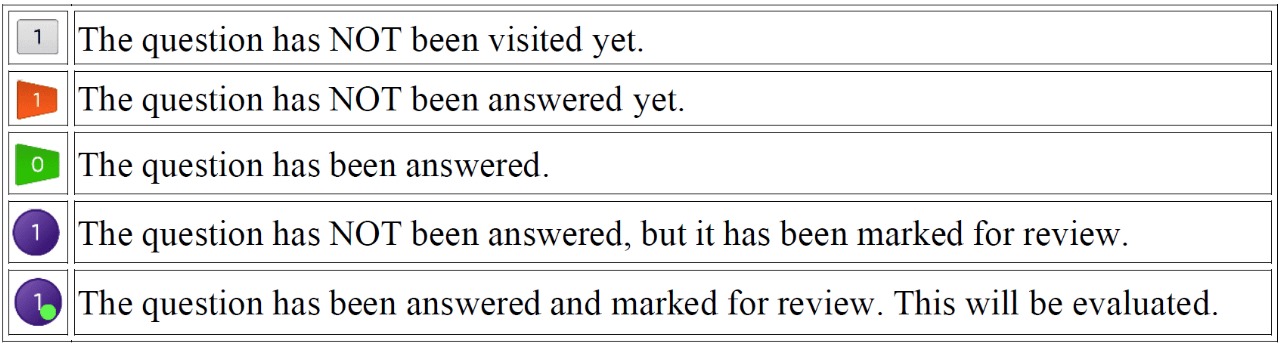
- You can click on the arrow
-
which appears to the left of question palette to collapse the question palette thereby maximizing the question window.
To view the question palette again, you can click on
which appears on the right side of the question.
Navigating to a Question:To answer a question, do the following:
- Click on the question number in the right-side Question Palette to go directly to that question. Note: This option does NOT save your answer for the current.
- Click on Save & Next to save your answer for the current question and then go to the next.
- Click on Mark for Review & Next to save your answer for the current question, mark it for review, and then go to the next.
Answering a Question:
- Procedure for answering a multiple-choice type question (MCQ):
- To select your answer, click on the button of one of the options.
- To deselect your chosen answer, click on the button of the chosen option again or click on the Clear Response.
- To change your chosen answer, click on the button of another.
- To save your answer, you MUST click on the Save & Next.
- To mark the question for review, click on the Mark for Review & Next.
Ready to Begin?
Once you start, the timer will begin and cannot be paused.